theCommons Academy

The Living Library

What are you here to do?

Pick a goal — we’ll point you to the right free first step.

Find your archetype — 3 min

Start from the problem

What do you need to get done today?

Pick the outcome you're after. We'll open the short missions that get you there. Nine missions, grouped five ways — some show up in more than one bundle.

Find it fast

Search the whole Library

Free · no login needed

Freebies From Foundations

Free from our Foundations series — watch the builds, grab the tools. The rest lives in the Library.

Free printables & worked examples

One for each part — no login needed. Print them, share them, keep them by the keyboard.

Fence Your AI Self: Can I Safely Put This In? — Part 3

The work session: sort real inputs into feed, redact, or leave out.

Fencing Your AI Superpowers — with Dwayne Ross

The evening session: a second pass at the fence, with fresh questions.

Session replays are free to watch.

Free

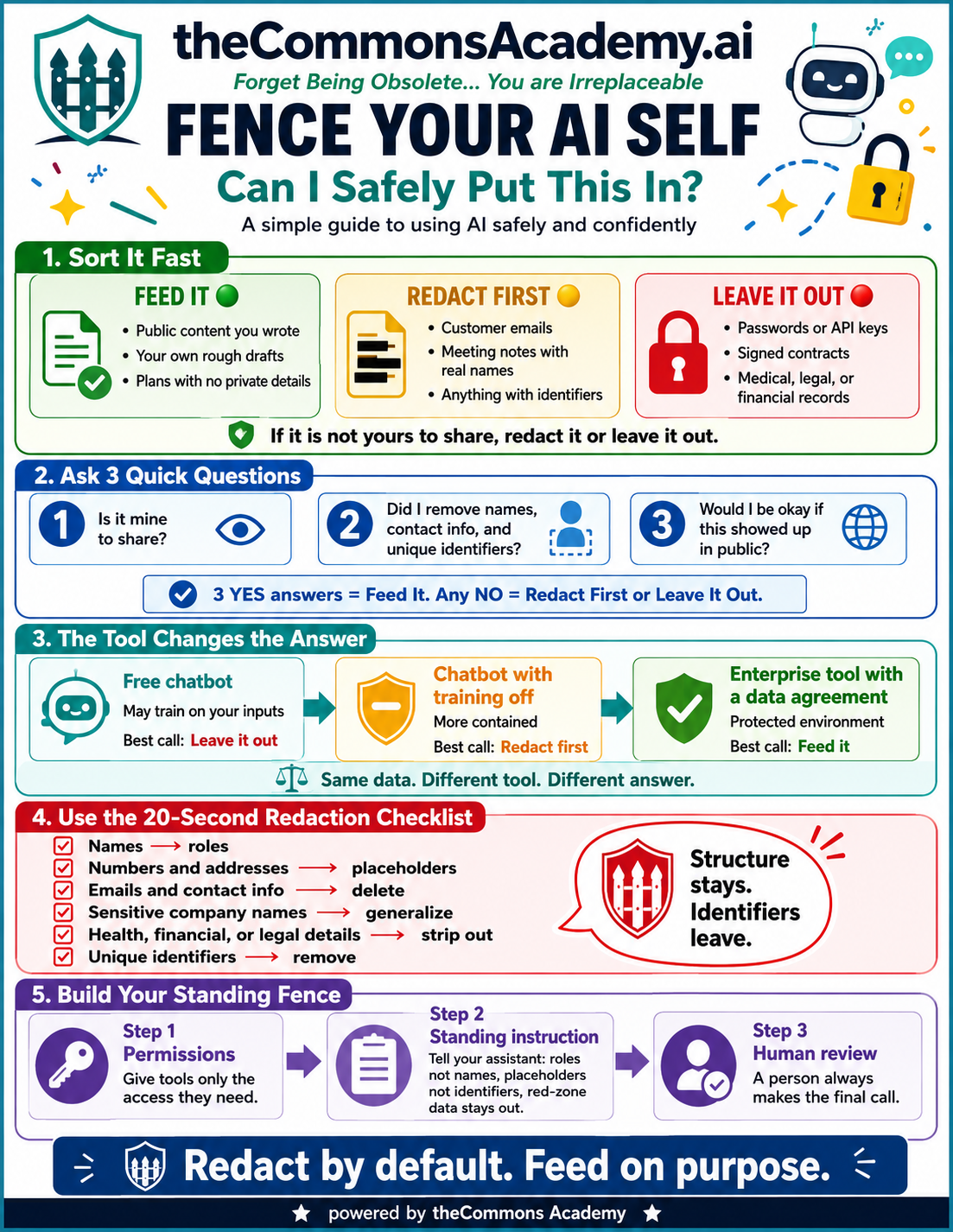
The FENCE one-pager — “Can I Safely Put This In?”

The whole fence on one page: sort it fast, the three questions, tool tiers, the 20-second redaction checklist.

FENCE YOUR AI SELF — Can I Safely Put This In? infographic
Free

“Keep Sensitive Data Out of AI” — audio guide

The short listen: what's safe to paste, what needs scrubbing, and what stays out for good.

The interactive session canvas, the worked examples, the fence tools, and the frameworks + blueprint are inside the Library.

Everything else lives in the Library

$357/year or $39/month.

A person always makes the final call. · Acute Incite · powered by theCommons Academy

Micro Lessons · Free

Six bite-size lessons to get you up to speed on AI.

Each lesson has a dedicated page with the curriculum, a preview to try, and a single next action. Read them in order or jump to what you need.

01
02
03
04
05
06

Do all six in order, or pick the one you need. The Applied Courses have no prerequisite.

Finished the six? Step 3 · Diagnose your work with the free FrictionIndex™ →

Your path, in five steps

Steps 1–3 are free. Steps 4 and 5 unlock with the Library.

Live Sessions · 22-week series

Every packet — as it airs, then in the Library.

Free preview is public. The full kit unlocks each Thursday at 12:00pm ET for members.

  • Week 01 · BuildFreeLive

    Build Your Second Brain (NotebookLM)

    Build your Second Brain in NotebookLM — a private, source-grounded thinking partner trained on your own work. Session 1 of Clone Yourself.

    Aired THU, JUL 16 · 12:00PM ET

  • Week 02 · BriefingFreeLive

    Teach AI to Sound Like You

    Your Second Brain learns to write and speak like you — a durable voice model you can reuse.

    Aired THU, JUL 23 · 12:00PM ET

  • Week 03 · BuildFreeLive

    Fence Your AI Self: Can I Safely Put This In?

    Your Fence: decide what's safe to put into AI, and what stays behind the line.

    Aired THU, JUL 30 · 12:00PM ET

  • Week 04 · BriefingFreeLive

    One You, Many Outputs

    Your Reach: turn one you into many outputs without losing the through-line.

    Aired THU, AUG 6 · 12:00PM ET

  • Week 05 · BuildLibraryLive

    Find Your Friction (and Map It Before You Build)

    Pick the right task and map it end-to-end before you build — the single move that saves the most time later.

    Aired THU, AUG 13 · 12:00PM ET

  • Week 06 · BriefingLibraryLive

    Leading the Change: Adoption Without the Fear

    Lead adoption without fear: how to bring a team along so the tools actually get used.

    Aired THU, AUG 20 · 12:00PM ET

  • Week 07 · BuildLibraryLive

    Flash Mission: Inbox Zero in 20 Minutes

    Clear the backlog in twenty minutes, and keep the reply rule that did it.

    Aired THU, AUG 27 · 12:00PM ET

  • New this week
    Week 08 · BuildLibraryLive

    Flash Mission: Meeting Notes to Action Items

    Leave the meeting with owners and dates instead of a wall of notes.

    Aired THU, SEP 3 · 12:00PM ET

  • Week 09 · BuildLibraryUpcoming

    Flash Mission: Meeting Notes to Action Items

    A one-page status report in five minutes, and a skeleton you reuse every week.

    Releases THU, SEP 17 · 12:00PM ET

  • Week 10 · BuildLibraryUpcoming

    Flash Mission: Project Status Report in 5 Minutes

    Turn the same five support questions into an FAQ you actually trust.

    Releases THU, SEP 17 · 12:00PM ET

  • Week 11 · BuildLibraryUpcoming

    Flash Mission: Ask Your Own Work a Useful Question

    Combine your voice notes and source material into a polished, on-brand document.

    Releases THU, SEP 24 · 12:00PM ET

  • Week 12 · BriefingLibraryUpcoming

    Flash Mission: Decide It in Ten Minutes

    Teach a model to sound like you without giving up your voice.

    Releases THU, OCT 1 · 12:00PM ET

  • Week 13 · BuildLibraryUpcoming

    Flash Mission: Check It Before You Send It

    From public research to a message that reads like you actually did the work — because you did.

    Releases THU, OCT 8 · 12:00PM ET

  • Week 14 · BriefingLibraryUpcoming

    Flash Mission: Answer It Once, Not Fifty Times

    Why your own data is the durable advantage — and how to prepare it.

    Releases THU, OCT 15 · 12:00PM ET

  • Week 15 · BuildLibraryUpcoming

    Flash Mission: Proposal Draft in 20 Minutes

    Read a dense document and get plain-English risk flags a person can act on.

    Releases THU, OCT 22 · 12:00PM ET

  • Week 16 · BriefingLibraryUpcoming

    Flash Mission: Your Week on One Page

    Take a personal AI habit and turn it into a team system.

    Releases THU, OCT 29 · 12:00PM ET

  • Week 17 · BuildLibraryUpcoming

    Flash Mission: The Safe-and-Never List

    A chatbot that answers only from your own documents — with citations.

    Releases THU, NOV 5 · 12:00PM ET

  • Week 18 · BriefingLibraryUpcoming

    Flash Mission: Where the Week Actually Goes

    The operator's rhythm: what to run weekly, monthly, and quarterly so the system keeps paying.

    Releases THU, NOV 12 · 12:00PM ET

  • Week 19 · BuildLibraryUpcoming

    Flash Mission: Hand It Over

    Take one asset and adapt it cleanly for every channel without diluting the message.

    Releases THU, NOV 19 · 12:00PM ET

  • Week 20 · BriefingLibraryUpcoming

    Flash Mission: The Standing Instruction

    How small teams stack AI leverage without adding headcount.

    Releases THU, DEC 3 · 12:00PM ET

  • Week 21 · BuildLibraryUpcoming

    Flash Mission: Prove It Saved Time

    Triage inbound inquiries and draft an accurate first answer for a person to send.

    Releases THU, DEC 10 · 12:00PM ET

  • Week 22 · BriefingLibraryUpcoming

    Flash Mission: Set the Team Up for January

    Build trust and stay compliant while shipping fast — the guardrails that matter.

    Releases THU, DEC 17 · 12:00PM ET

  • Week 23 · BuildLibraryUpcoming

    Sequence + Human Approval

    Run a multi-step sequence that pauses for human approval at the right moments.

    Releases THU, JAN 7 · 12:00PM ET

  • Week 24 · BriefingLibraryUpcoming

    Measuring What Matters

    The handful of numbers that actually tell you AI is working.

    Releases THU, JAN 14 · 12:00PM ET

  • Week 25 · BuildLibraryUpcoming

    the Studio — Brief to On-Brand Visual

    From a short brief to an on-brand visual you can ship.

    Releases THU, JAN 21 · 12:00PM ET

  • Week 26 · BuildLibraryUpcoming

    the Operator — Knowledge to SOP

    Turn tacit knowledge into a durable SOP the team can follow.

    Releases THU, JAN 28 · 12:00PM ET

  • Week 27 · BriefingLibraryUpcoming

    The Road Ahead

    What's likely next — and how to plan for it without overreacting.

    Releases THU, FEB 4 · 12:00PM ET

  • Week 28 · BuildLibraryUpcoming

    the Coach — Personalized Guided Learning

    A personalized coach that meets each learner where they are.

    Releases THU, FEB 11 · 12:00PM ET

Flagship Tracks

The eight tracks inside the Library.

8 tracks
LibraryDiagnostic Minis — FrictionIndex · HOZ Mapper · Readiness

Three 10-minute reads that tell you what to fix first.

What's inside

  • FrictionIndex™ — where hours and dollars leak
  • HOZ™ Mapper — the calls that stay human
  • Readiness Reckoning — the six conditions before you automate

You'll walk out with: a shortlist of what to fix first.

Subscribe to open
LibraryCore AI Prompt Library

Stop reinventing prompts for the work you repeat.

What's inside

  • Four ready prompts: Discovery Notes, Governance, Strategy, Hand-off
  • A copy button on each
  • A 'where a person checks' line

You'll walk out with: a saved, reusable prompt set.

Subscribe to open
LibraryAdvanced Prompt Architecture

One-off prompts are fine for one-off work. This session shows you how to chain prompts into a reliable, repeatable system — with a checkpoint where a person approves before it acts.

What's inside

  • Why a chain beats one big prompt
  • Map first, prompt second
  • The human checkpoint
  • Save it as a reusable chain
  • The reusable-chain kit (template + worked examples)

Free sample →

You'll walk out with: one saved, reusable prompt chain with a human checkpoint.

Subscribe to open
LibraryDocument Analysis & Synthesis

Facing a stack of reports and memos? This session helps you read, compare, and synthesize them — then recast the result for whoever needs it, and check it before you trust it.

What's inside

  • Read one document well
  • Compare, then synthesize
  • Recast for any audience
  • Check it before you trust it
  • Save your reusable synthesis workflow

Free sample →

You'll walk out with: one reusable read-compare-synthesize workflow.

Subscribe to open
LibraryStrategic Decision Making

Use AI to think harder, not just faster — to pressure-test a real decision before you commit.

What's inside

  • Frame the real question first
  • Build a decision table
  • Stress-test before you commit
  • Make the call — and own it

Free sample →

You'll walk out with: one decision — framed, tabled, stress-tested, and made.

Subscribe to open
LibraryResponsible AI Use & Guardrails

AI is fast and useful — and sometimes confidently wrong. This session shows you where it’s likely to slip and exactly what to do about it.

What's inside

  • It predicts patterns — it doesn’t check facts
  • When it drifts, rewrite the ask — don’t argue
  • The three-strikes rule
  • What never goes into a public tool
  • Your one-page team rule

You'll walk out with: a one-page rule your whole team can follow.

Subscribe to open
LibraryEnterprise Scaling & Copilot Mastery

Take AI from a personal habit to a team system — with three Microsoft 365 Copilot workflows you can put to work this week, and a person approving before anything goes team-wide.

What's inside

  • Start a shared team prompt library
  • A chatbot that answers from your own documents
  • Three Copilot workflows to put to work this week
  • Roll it out safely

Free sample →

You'll walk out with: a safe team rollout plan.

Subscribe to open
LibraryThe 30-Day AI Starter Pilot

Run a 30-day starter pilot with tools you already pay for.

What's inside

  • A week-by-week 30-day plan
  • One task automated and verified
  • An hours-back tally

Free sample →

You'll walk out with: a documented pilot and a real hours-saved number.

Subscribe to open

Also inside

Clone Yourself · Foundations Day

Replay freeToolkit · Members

Clone Yourself · Part 1 — Build Your Second Brain

Replay freeToolkit · Members

Clone Yourself · Part 3 — Fence Your AI Self: Can I Safely Put This In?

Replay freeToolkit · Members

Clone Yourself · Part 2 — Teach AI to Sound Like You

Replay freeToolkit · Members

Clone Yourself · Part 4 — One You, Many Outputs

Replay freeToolkit · Members

Arc 2 · Task & Change · Part 1 — Find Your Friction

Replay freeToolkit · Members

Arc 2 · Task & Change · Part 2 — Leading the Change

Replay freeToolkit · Members

Flash Mission — Inbox Zero in 20 Minutes

Replay freeToolkit · Members

Team Play

Free to play. Facilitator kits are members-only.

Free

Flash Team!

10 minutes. Draft the right mix of people + one AI helper for a real mission. Survive the twist.

Play now →
Members

Flash Team! Facilitator Kit

Print-and-cut cards, 100-point rubric, 15/30/45-minute run scripts, debrief guide, and 5 variants.

Open the kit
Coming soon

Rollout!

Lead a change your team actually adopts — plan the rollout step by step. Landing soon.

Coming soon

Rollout! Facilitator Kit

The facilitator guide and assets to run Rollout! with your team. Landing soon.

What's actually in here

6

free micro lessons

11

tools & canvases

13

applied courses

11

live sessions & replays

Every Thursday brings a new work session, then it is kept here — the session canvas, the fillable templates, and the frameworks. Free stays free. A person always makes the final call.

Buy once · $67–$147

Not ready for the Library? Start with one course.

Each one is a finished thing you keep — no subscription, no expiry. Members get the whole shelf.

Bought one in the last 7 days? Reply to your receipt and we'll credit it toward your Library membership.

Ready for the whole thing?

The replays are free on YouTube. The workshop isn’t. Membership gets you the full interactive session canvas, fillable templates, and your own progress dashboard. $357/year or $39/month.

Session replays are free to watch.

$357/year or $39/month.